

As part of the Windows Insider Program, Microsoft released several preview builds of Windows 11 in early July 2026, some of which introduced new features and others only improvements for existing experiences.
In the first two weeks of July, the company began the public test of the Cloud rebuild recovery feature, revealed a new design update for the account manager available through the Start menu, and made other improvements for version 26H2
In addition, Microsoft is continuing to expand previously announced features to more Insider channels, including the ability to upgrade from Windows 11 Home to Pro Education for K-12 environments. The company is also rolling out Taskbar position and size options, along with Windows Update improvements designed to reduce the number of required restarts each month.
In the Experimental track, we've seen builds 26300.8772 and 28120.2387, and builds 28020.2380 and 26220.8764 have been released in the Beta channel.
In this recap, I'll highlight the latest and most noteworthy changes available through the Windows Insider Program.
Biggest improvements from the Windows Insider Program in July 2026
In this recap, I'll highlight the latest and most noteworthy changes available through the Windows Insider Program since my last roundup.
Cloud rebuild new feature
Starting with build 26300.8772, Windows 11 introduces a new recovery feature known as "Cloud rebuild," which has been designed to make it easier to reinstall the operating system when the computer is unable to start, or you're looking for a fresh install.
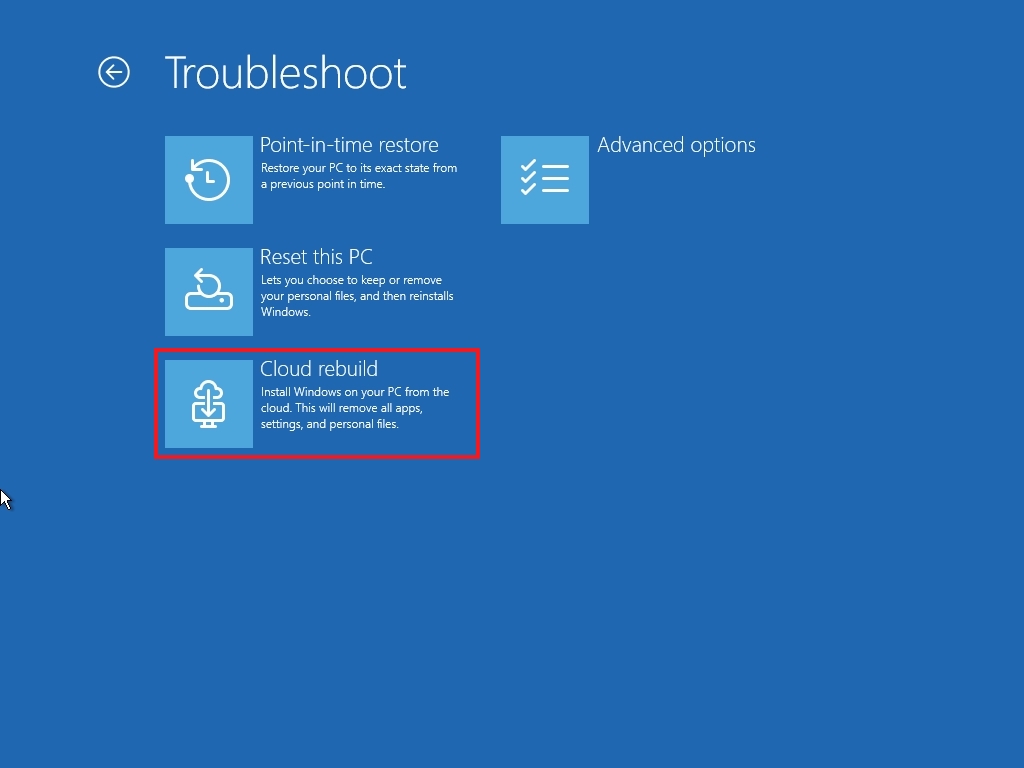
If this feature sounds familiar, it's because it's similar to the Cloud download option in Reset this PC. However, Cloud rebuild introduces a new workflow that downloads the Windows 11 installation files and drivers and performs a clean installation without requiring a bootable USB drive, a custom recovery image, or access to the desktop environment.
Cloud rebuild can be accessed from the Windows Recovery Environment (WinRE) by going to the "Troubleshoot" page and using the "Cloud rebuild" option.
Before you can use the feature, the computer must be running Windows 11 on compatible hardware, and the device must be connected to the internet using a wireless or wired connection.
Once you confirm the Windows 11 version, edition, and language, click "Install," and the system will erase the hard drive and reinstall the operating system and drivers.
Account Control flyout redesign
In the Start menu, Microsoft is also updating the Account Control flyout with build 26300.8772. The new design offers a more modern style that highlights your account information and picture.
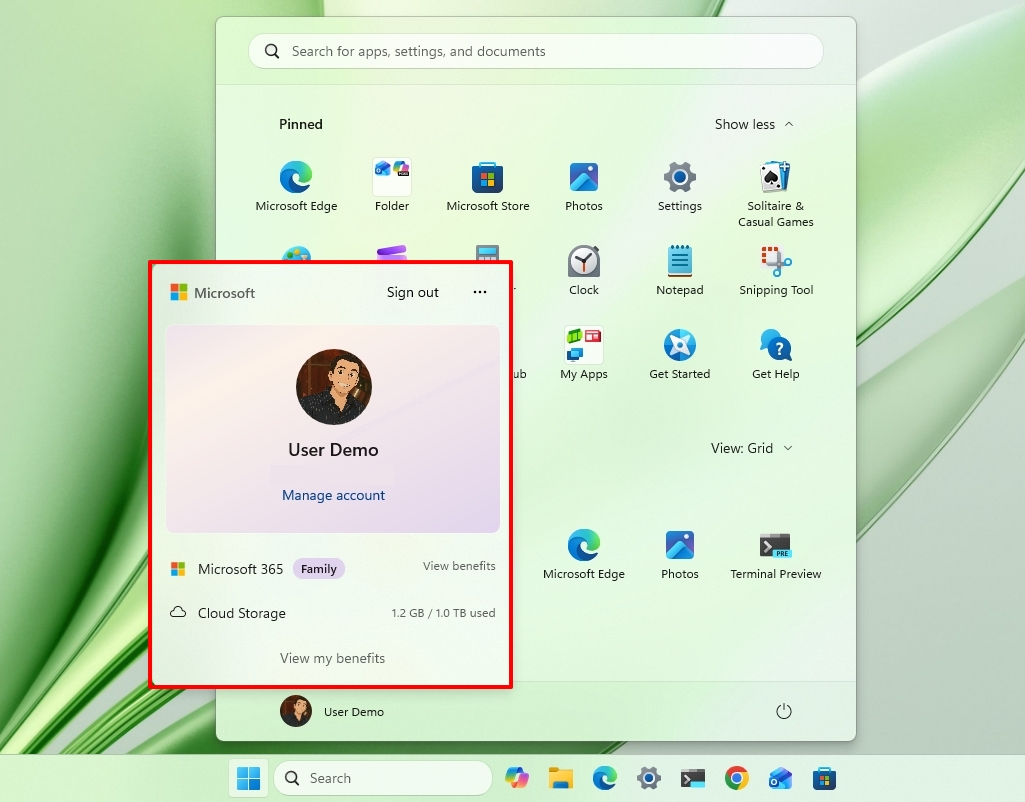
It also highlights your Microsoft 365 subscription, cloud storage, and access to your benefits.
Backup and restore default settings
In commercial computers, starting with the preview build 26300.8772, Windows 11 is enabling the backup and restore feature policy by default for devices enrolled in a Microsoft Entra ID or Entra hybrid-joined environment.
The idea is to start the device with backup protection to make recovery smoother. For example, when a device is reset or replaced, users can quickly return to their personalized desktop without extra steps.
Of course, network administrators can always control this experience, and Microsoft notes that existing policies will remain in effect, and manually configured settings always take priority over the default behavior.
Taskbar position settings
The company is also bringing back the ability to change the Taskbar location with the release of build 28120.2387 in the Experimental channel.
This change allows users to place the Taskbar at the top of the screen, as well as at the left or right edges, rather than being limited to the bottom.
The setting appears on Settings > Personalization > Taskbar, under the "Taskbar behaviors" section. The setting is called "Taskbar position."
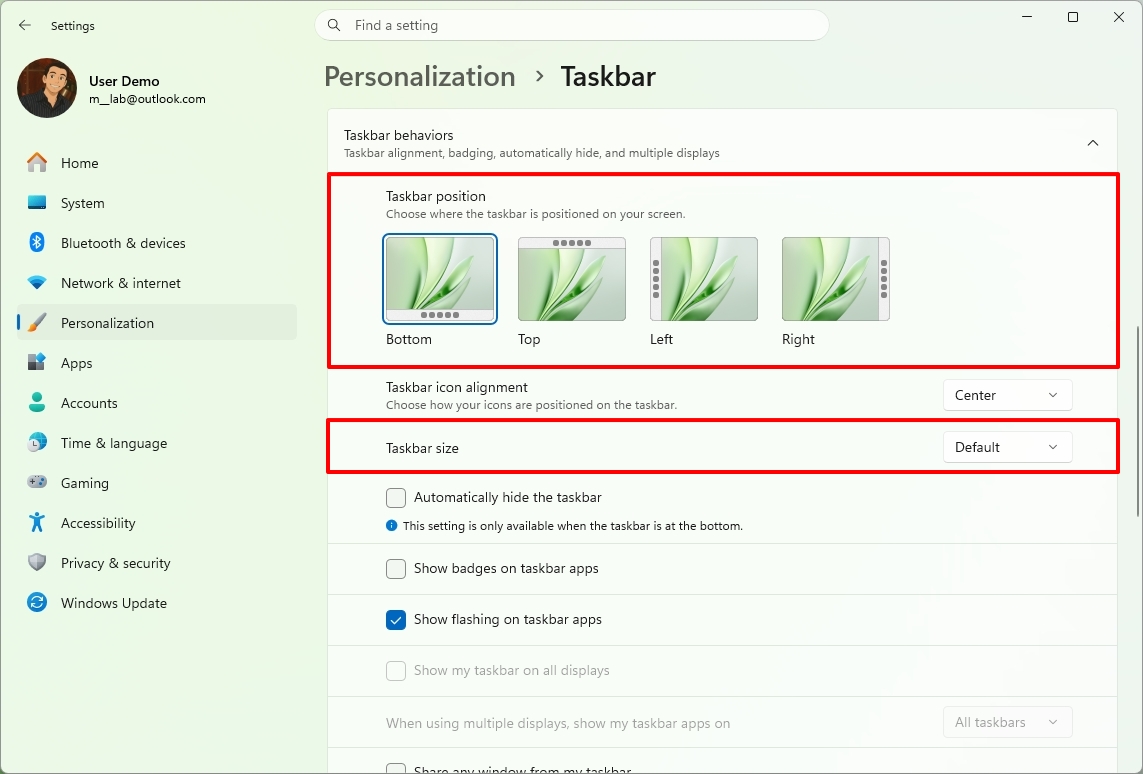
The company notes that flyouts, tooltips, and animations will follow the Taskbar orientation regardless of the position.
Also, most existing features will continue to work, including the option to ungroup and show labels for apps.
Furthermore, the company is updating the "Show smaller taskbar button" option to make the Taskbar smaller instead of just the buttons. (As we have already seen in other tracks, the company is expected to create a separate option to make the Taskbar smaller.)
Windows Update with fewer reboots
As part of Windows 11 build 26220.8764, the company is introducing a new unified Windows Update experience that coordinates monthly quality updates with driver, .NET, and firmware updates.
By bundling these updates into a single installation cycle whenever possible, Microsoft aims to reduce the number of restarts users experience each month, with the long-term goal of requiring just one monthly reboot.
Windows 11 Pro Education for K-12 free upgrade
Microsoft is changing the installation requirements to allow devices running Windows 11 Home to upgrade to Windows 11 Pro Education at no additional cost for K-12 education.
This change aims to give schools more flexibility when acquiring new devices. However, the company says that this is one-way only. After the upgrade, the only way to roll back to the Home edition is by performing a clean installation of the operating system.
Windows Search upgrades
Outside its regular download schedule, Microsoft recently began rolling out a slew of improvements to the Windows Search experience on devices enrolled in the Experimental channel.
First, the company is decluttering the home screen and focusing on the search experience. As part of this rollout, the Windows Search home screen only includes your recent searches, ditching the visual clutter, including those annoying advertisements.
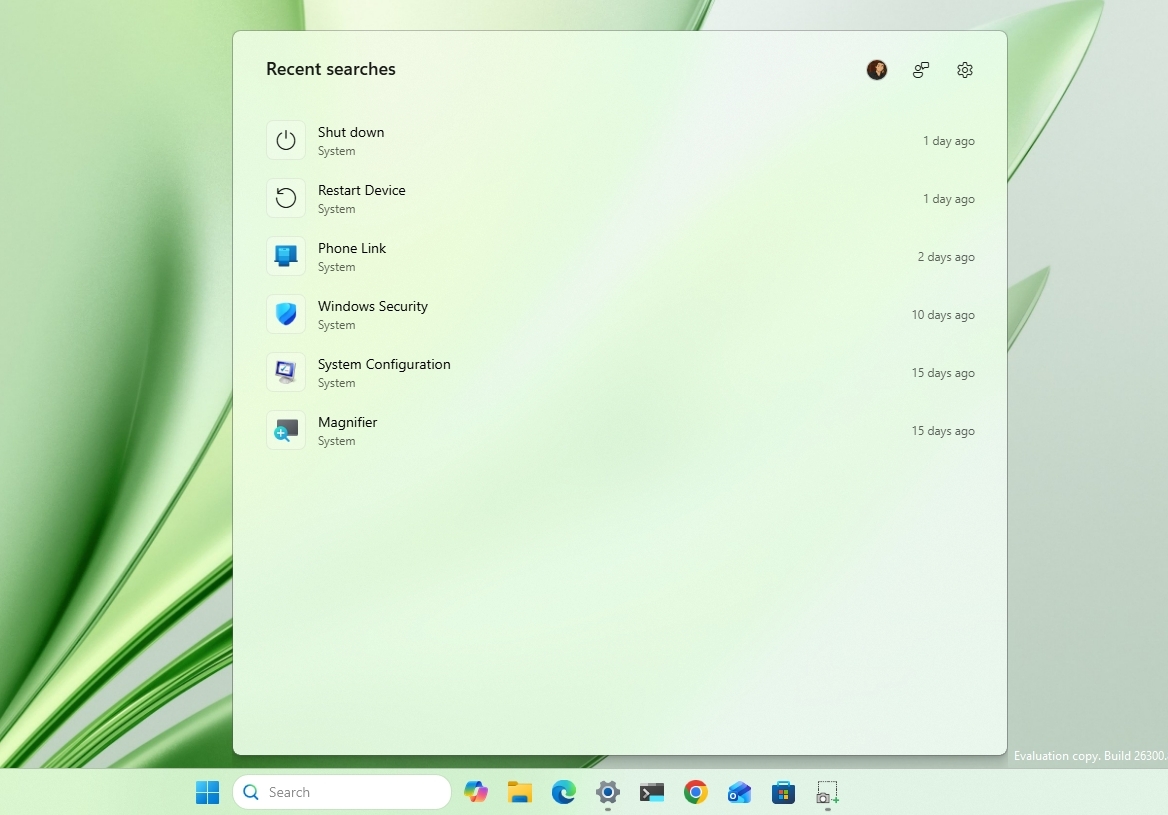
In addition, when performing a search and a web result is more relevant, the experience will now prioritize the answer rather than products and promotions.
Microsoft is also introducing design tweaks to better indicate where each result comes from. For example, you'll find better spacing between items and interface changes when selecting a result, including thumbnail previews.
Second, you'll now have more control over search results with the options to disable web searches and Microsoft Store apps from appearing in the Windows Search experience.
However, by default, search will work as always. It's up to you to customize your search experience from Settings > Privacy & Security > Search.
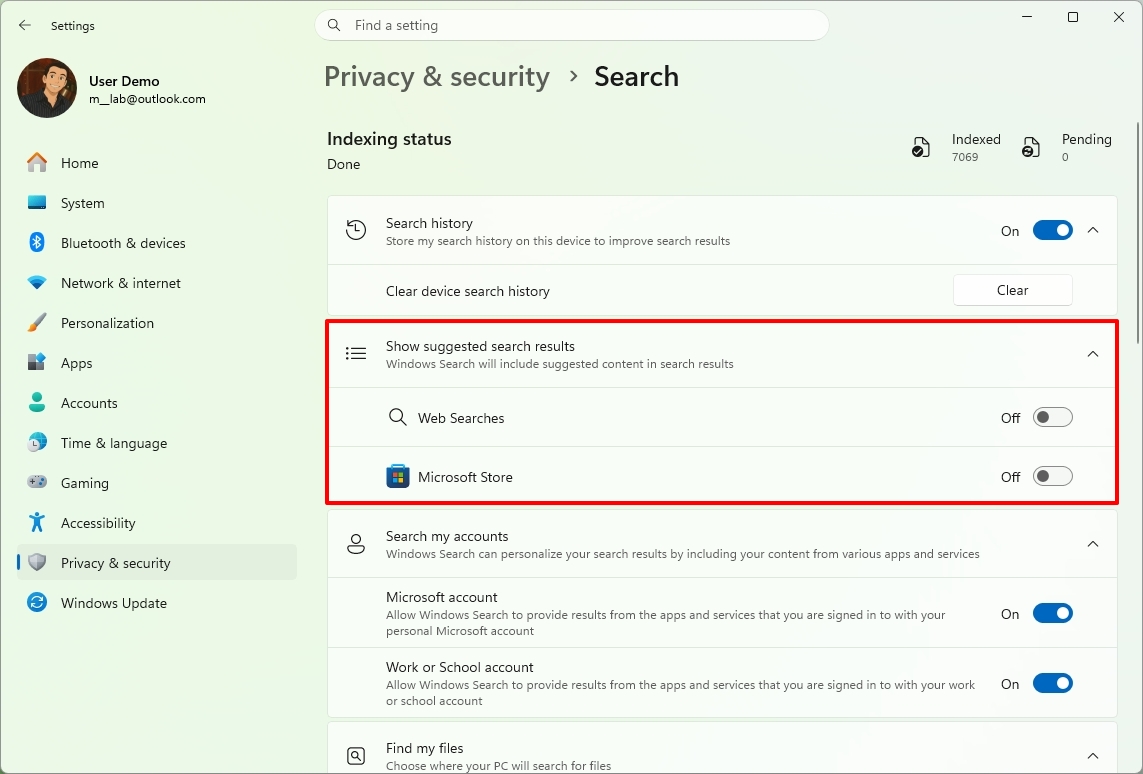
Third, the search experience now improves local content and rankings, meaning local results are given higher priority in apps, settings, and files, instead of web and Microsoft Store results showing up first when there are better results.
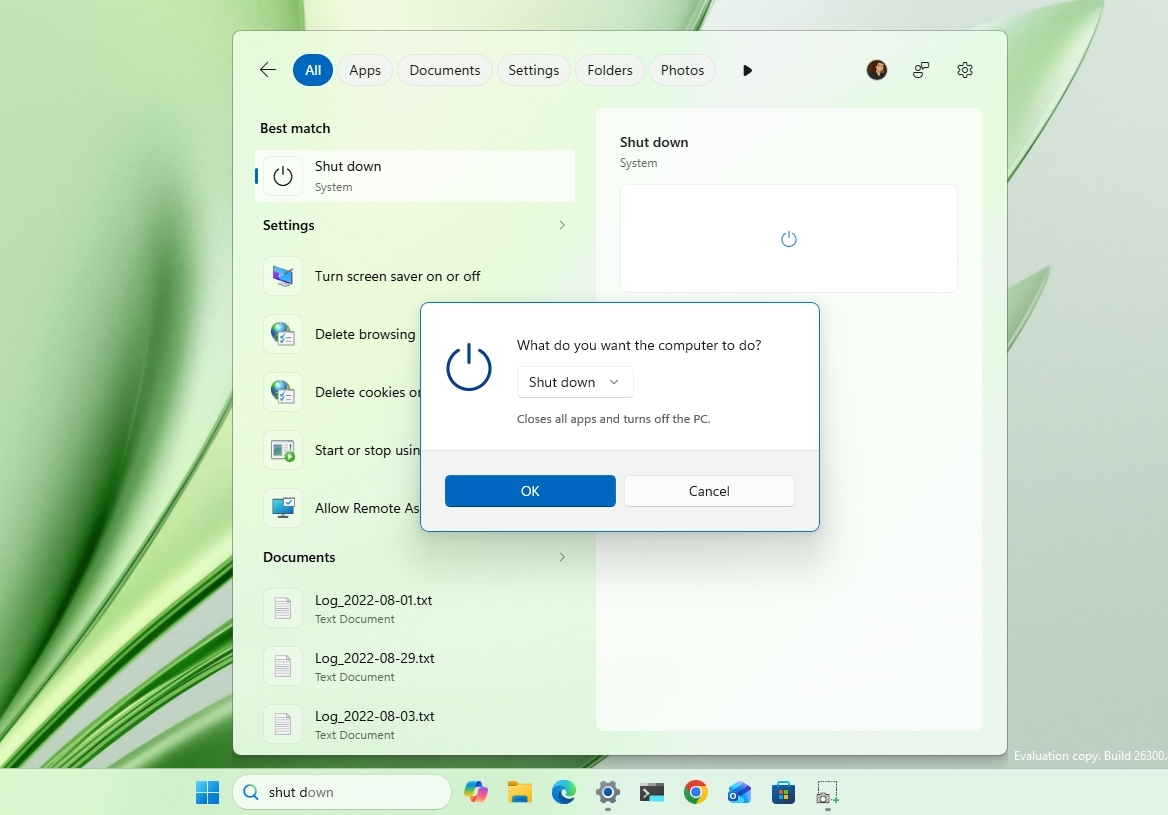
As part of the ranking tweaks, you'll notice that searches for settings now appear higher in the results.
Fourth, Microsoft is also focusing on improving search accuracy through two specific changes. For instance, Windows Search has been updated to better handle typos, missing or extra letters, and partial words.
In addition, the feature will now show results for local files using two-character file search, and more accurately surface cloud and connected files when they're the best match.
Windows Central's Take
I think these Insider builds show Microsoft focusing on what Windows 11 has needed for a while, improving the experience instead of simply adding more features. Cloud rebuild could make recovery much less stressful, while the Windows Search changes address one of the operating system's biggest frustrations by prioritizing useful local results over web content.

The reappearance of Taskbar positioning is also a welcome change. It shows Microsoft is still paying attention to feedback and bringing back flexibility that many users have missed since Windows 11 launched.
What are your thoughts on these latest Windows 11 Insider changes? Let me know in the comments.
More resources
Explore more in-depth how-to guides, troubleshooting advice, and essential tips to get the most out of Windows 11 and 10. Start browsing here:
- Windows 11 on Windows Central — All you need to know
- Windows 10 on Windows Central — All you need to know

Join us on Reddit at r/WindowsCentral to share your insights and discuss our latest news, reviews, and more.
source https://www.windowscentral.com/microsoft/windows-11/windows-11-gets-6-useful-new-insider-features-in-early-july-and-one-could-save-your-pc
0 Comments